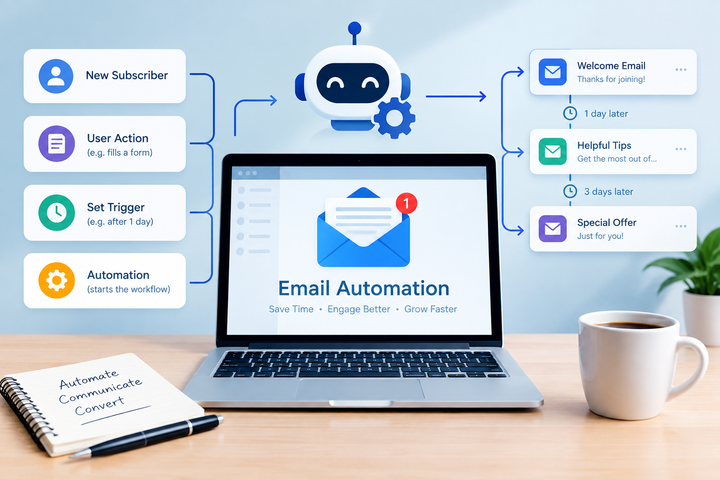
Email Automation Explore: Workflow Types, Trigger Events, Personalization and Campaign Planning
Email automation is a method of organizing email communication so that messages are sent automatically when particular conditions or events occur. Instead of manually preparing every message, an automated workflow uses predefined rules, timing, audience information, and trigger events to determine when a message should be sent.
The concept developed alongside email marketing and customer relationship management systems. As organizations began collecting larger amounts of digital information, automated workflows became a way to manage recurring communication, such as account confirmations, reminders, newsletters, onboarding messages, and follow-up sequences.
A typical email automation workflow contains four basic elements: a trigger, a condition, an action, and a timing rule. For example, when someone joins an email list, the trigger can start an introductory sequence. A condition might determine whether the person opened the previous message, while the action could send another message after a specified period.
How an automated workflow operates
Email automation generally follows a sequence of logical steps:
- Trigger event: A defined action or condition starts the workflow.
- Audience data: Information such as subscription status, preferences, or previous interactions determines who receives a message.
- Rules: Conditions determine which path a recipient follows.
- Message: A prepared email is sent according to the workflow.
- Measurement: Delivery, opens, clicks, unsubscribes, and other available indicators can be reviewed.
This structure allows communication to follow consistent rules rather than depending entirely on manual scheduling.
Common workflow types
Different situations require different automation patterns. A welcome workflow can introduce a person to a publication after subscription, while an educational sequence can send related information at planned intervals.
Reminder workflows can be connected to events or account activity. Re-engagement workflows can identify inactive subscribers and provide an option to change communication preferences. Transaction-related messages, such as password-reset instructions or confirmation notices, can also be triggered by specific actions.
Importance
Email automation matters because digital communication often involves repeated interactions with large groups of people. Manually managing every message can become difficult when recipients join at different times or take different actions.
Automation can organize these interactions around individual events. A person who subscribes today can enter the same workflow as someone who subscribed several weeks earlier, while timing rules determine when each person receives the next message.
Personalization and relevance
Personalization refers to adapting email content or timing using information that is appropriate for the recipient. Basic personalization may use a person's name or preferred language, while more advanced systems can consider previous interactions, content preferences, or subscription categories.
Personalization should be based on appropriate data and clear expectations. Using excessive or unexpected personal information can make communication appear intrusive and can create privacy concerns.
Campaign planning
Campaign planning involves deciding what the communication is intended to accomplish, who should receive it, what sequence should be used, and how results will be evaluated.
A simple planning framework can include:
- Objective: Define the communication purpose.
- Audience: Identify the relevant group or segment.
- Trigger: Determine what event begins the workflow.
- Content: Prepare clear messages for each stage.
- Timing: Establish reasonable intervals between messages.
- Conditions: Define alternative paths based on recipient actions.
- Measurement: Select indicators that help assess delivery and engagement.
- Review: Check results and adjust the workflow when appropriate.
A well-defined plan also distinguishes between automated transactional communication and subscription-based communication. This distinction can affect both workflow design and compliance requirements.
Trigger events in everyday email automation
Trigger events can originate from many types of activity. Examples include a new subscription, account creation, form completion, event registration, content download, preference change, or a period of inactivity.
The following table illustrates common examples:
| Trigger event | Possible workflow | Typical purpose |
|---|---|---|
| New subscription | Welcome sequence | Introduce communication preferences |
| Account creation | Account confirmation | Confirm account activity |
| Form completion | Follow-up sequence | Provide related information |
| Event registration | Reminder sequence | Provide event details |
| Preference update | Preference confirmation | Confirm the selected settings |
| Extended inactivity | Re-engagement workflow | Ask whether communication is still wanted |
| Password reset request | Transaction message | Provide account instructions |
Triggers should be specific enough to prevent accidental or repeated messages. A workflow can also include safeguards, such as limits on message frequency and rules that remove people from a sequence after a particular event.
Recent Updates
Email automation has changed significantly as email providers have placed greater emphasis on authentication, sender identity, recipient choice, and message quality.
One notable development has been the expansion of Gmail sender requirements. Google introduced additional requirements for bulk senders beginning in 2024. Senders reaching approximately 5,000 messages per day to personal Gmail accounts are expected to use SPF, DKIM, and DMARC authentication, maintain appropriate sender alignment, and support one-click unsubscribe for relevant marketing messages.
Google has also continued enforcement and monitoring during 2025 and 2026. Its guidance states that non-compliant bulk traffic can experience delivery disruptions, including temporary or permanent rejection, while Postmaster Tools provides information about authentication, spam reports, and compliance status.
Greater attention to email authentication
SPF, DKIM, and DMARC are now important parts of email infrastructure. SPF identifies authorized sending sources, DKIM provides a cryptographic signature for messages, and DMARC helps receiving systems evaluate whether the sender identity is properly aligned.
These technologies are primarily concerned with sender authentication and protection against spoofing. They are separate from the creative content of an email campaign but can influence whether messages reach an inbox.
More controlled personalization
Another continuing trend is the use of audience segmentation and behavioral triggers. Instead of sending exactly the same sequence to everyone, automation platforms can create different paths based on actions or stated preferences.
At the same time, privacy expectations have encouraged organizations to examine what information they collect and how it is used. Automated personalization therefore increasingly involves data governance alongside campaign planning.
Improved monitoring
Email automation systems commonly provide dashboards for delivery results, bounce activity, spam complaints, unsubscribes, and engagement indicators. These measurements can help identify technical problems or workflows that need adjustment.
Google's Postmaster Tools also provides sender information for messages delivered to personal Gmail accounts, including authentication and compliance information.
Laws or Policies
Email automation is affected by privacy, electronic communication, and platform-specific rules. Requirements differ between countries, so organizations should consider the location of recipients and the laws applicable to their activities.
India and personal data
In India, the Digital Personal Data Protection Act, 2023 establishes principles concerning the processing of digital personal data. The Act describes consent as requiring a clear affirmative action and states that consent-based processing can be withdrawn, with withdrawal intended to be as easy as giving consent.
India's Digital Personal Data Protection Rules, 2025 provide additional requirements concerning notices and information given to individuals. The rules describe requirements for clear information about personal data and the purposes for which it is processed. Their commencement is structured in stages under the published notification.
For email automation, these principles are relevant when personal information is collected for segmentation, personalization, or automated communication. A workflow should therefore have a clearly defined purpose and should respect applicable choices concerning personal data.
Email platform requirements
Legal compliance is only one part of responsible email automation. Email providers can impose additional technical and operational requirements.
For example, Google's Gmail sender guidelines require authentication practices and establish additional requirements for high-volume senders. Marketing and subscription messages sent at qualifying volumes must also provide appropriate unsubscribe functionality.
These platform requirements can change over time, so current provider documentation should be reviewed when designing or updating an automated email system.
Tools and Resources
Email automation can involve several categories of tools. The appropriate combination depends on the size of the audience, the complexity of the workflow, the type of communication, and the available technical infrastructure.
Automation platforms
Common platforms provide visual workflow builders, audience segmentation, message templates, scheduling controls, and reporting dashboards. Examples include Mailchimp, HubSpot, Brevo, Klaviyo, and ActiveCampaign.
These platforms differ in their workflow capabilities, integrations, data controls, reporting features, and pricing structures. Their documentation can help explain how triggers, conditions, personalization fields, and subscription preferences are configured.
Authentication and monitoring resources
Domain administrators can use DNS management tools to configure SPF, DKIM, and DMARC. Google Postmaster Tools can help monitor information associated with email sent to personal Gmail accounts.
Planning templates can also be useful. A basic workflow worksheet can contain columns for trigger event, audience, condition, message, delay, exit rule, and measurement. Keeping these elements documented makes complex automation easier to review.
Content and testing resources
Email testing tools can help check formatting across different email applications and screen sizes. Preview functions can also identify missing personalization fields, broken links, formatting problems, or inconsistent sender information before a workflow becomes active.
A test sequence should ideally include several possible paths, including a recipient who takes the expected action and one who does not. This helps identify unintended loops or duplicate messages.
FAQs
What is email automation?
Email automation is a system that sends predetermined messages when specific trigger events or conditions occur. It can be used for welcome workflows, reminders, account messages, educational sequences, and other recurring communication.
How do email automation workflows work?
An automated workflow normally begins with a trigger event. Rules and conditions then determine which message is sent, when it is sent, and whether the recipient continues through the sequence.
What role does personalization play in email automation?
Personalization uses appropriate recipient information to adjust message content or timing. It can involve preferences, previous interactions, language, or other relevant information, provided the data is collected and used appropriately.
What are important email campaign planning steps?
Email campaign planning generally includes defining the objective, audience, trigger events, content, timing, conditions, measurement criteria, and exit rules. Privacy and unsubscribe requirements should also be considered where applicable.
What are SPF, DKIM, and DMARC in email automation?
SPF, DKIM, and DMARC are email authentication technologies. They help receiving systems verify sender identity and reduce certain forms of spoofing and unauthorized use of a domain. Gmail has specific authentication requirements for high-volume senders.
Conclusion
Email automation organizes recurring communication around defined trigger events, workflow rules, timing, and recipient information. Personalization can make automated messages more relevant when it is based on appropriate data and clear communication practices. Recent developments have placed greater attention on authentication, unsubscribe mechanisms, sender reputation, privacy, and monitoring. In India, data-protection requirements also make consent, purpose, and responsible handling of personal information important considerations when designing automated email workflows.